Product Overview
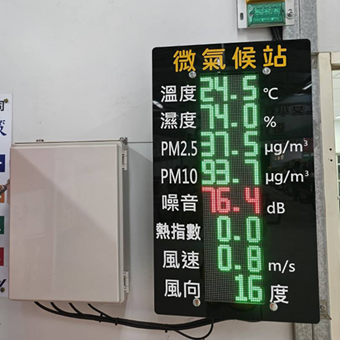
The JNC S400 is a Chinese-language LED outdoor sensor display using a color LED panel that shows sensor names, values and units in Chinese characters, and can integrate temperature/humidity, PM2.5/PM10, CO2, formaldehyde and other environmental sensors, receiving data over Ethernet or Wi-Fi in real time and showing it on an outdoor board. With the 4S360 environmental monitoring system, it can serve as a real-time environmental notice board at a site office entrance, plant perimeter or construction site, letting managers, workers and neighboring residents see the environmental quality at a glance.
Key Features
JNC S400Model Selection
Two sizes- Housing: 578×188×170 mm
- Display area: 512×128 mm
- P4 full-color LED
- Weight ≤ 8.5 kg
- Suited to site office doors and site entrances
- Housing: 1350×390×125 mm
- Display area: 1280×320 mm
- P10 full-color LED
- Weight ≤ 25 kg
- Suited to road works and public works
Sensor option codes
Sensor Data That Can Be Displayed
RS-485 / ModbusIntegrated temperature and humidity sensor shows site temperature (°C) and relative humidity (%) in real time, with automatic alerts when the heat index threshold is exceeded.
Shows fine particulate concentration (μg/m³); when site construction dust exceeds limits the LED switches to a warning color automatically to remind workers to protect themselves.
Shows CO2 concentration (ppm), suited to indoor air quality monitoring in site offices; exceeding the set value triggers linked control of ventilation equipment.
Shows indoor volatile organic compound concentration, suited to newly renovated site offices and temporary offices, ensuring a safe working environment.
Integrated noise sensor shows the construction site noise level, meeting community-relations management requirements, and pushes alert notifications when exceeded.
Integrated weather station sensor shows real-time wind speed (m/s) and direction, and displays a stop-work warning when wind speed exceeds limits for work at height.
Web Service Management Functions
Connect through a phone browser or computer to the web interface to see all channel values, alarm status and LED display content in real time; Traditional Chinese / English interface switching supported.
View daily, weekly and monthly trend charts, with per-channel maximum, minimum and time-of-occurrence queries, giving a basis for management decisions.
Each channel can have four independent alarm thresholds - high-high (HH), high (HI), low (LO) and low-low (LL) - with customizable alarm delay and deadband.
History, event and hourly records can be downloaded as CSV files from the web interface, or saved automatically to a USB flash drive, using about 41KB of storage per day.
Customize the LED panel's display channels, text colors, rotation order, scrolling speed and alarm slogans to tailor the displayed content to site needs.
Supports 1 relay output (24VDC/1A) to control ventilation equipment, warning lights or defogging total heat exchangers, achieving automated environmental control.
4S360 Environmental Monitoring System Integration
Ready out of the boxThe S400 LED board integrates with the 4S360 site office information display system, so PM2.5, CO2, temperature and humidity values are shown on the indoor management screen while the outdoor LED board publishes them outward at the same time.
When PM2.5, noise, CO2 or other values exceed the set thresholds, the 4S360 platform pushes LINE group or Teams notifications immediately to tell site managers and safety officers to act.
All sensor values are stored automatically in the 4S360 database, with daily, weekly and monthly report export, meeting OSHA environmental monitoring record requirements.
Installation and Connection Guide
The S400-SO standard model can be wall-mounted or post-mounted, with 4 fixing holes on top; suited to site entrance walls, posts or site office exterior walls, with a recommended mounting height of 1.5–2 m.
There are 4 terminal groups: ① +24V/GND power (9–36VDC) ② D+/D- RS-485 communication ③ DI/GND dry contact input ④ COM/NO relay output. After wiring, connect the network cable to the LAN or configure Wi-Fi.
Turn on Wi-Fi on a mobile device, search for "JNC IAQ SENSOR" and connect; once connected, enter 192.168.0.140 in a browser to reach the Web Service settings and complete the IP, sensor channel and LED display settings.
Via Modbus TCP or RS-485, the S400 sensor values connect to the 4S360 environmental monitoring system and are presented together on the site office dashboard, LINE alerts and management reports.
Applications
Need advice on choosing an LED environmental display?
Based on your installation location, sensor needs and system integration plan, we provide the most suitable model configuration and quote.
Compatible Systems
 4S360 Smart Construction Site Safety Management Platform (Cloud)
4S360 Smart Construction Site Safety Management Platform, cloud edition. No self-hosted server required, includes the 4S360 management app and supports switching between multiple sites. Cloud-exclusive personnel positioning module; the shield tunneling module (PVMS) can be added.
 4S360 Smart Construction Site Safety Management Platform (On-Premises)
4S360 Smart Construction Site Safety Management Platform, on-premises edition. Deployed on the customer's own servers, it integrates face-recognition access control, vehicle management, AI equipment detection, environmental monitoring and LINE push notifications. You keep full control of your data; licensed per site.
 Site Office Customized Information Display Board System
Integrates live IP camera feeds, people and vehicle access statistics and environmental monitoring values, presenting the real-time status of the entire site on the site office's large screen. Supports light/dark mode switching.