Product Overview
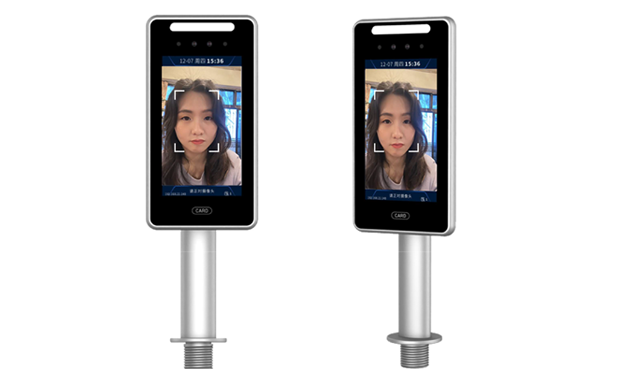
The TR307L is the turnstile-mount version of the TR307 series, designed for tripod turnstile lanes, with a metal post bracket at the bottom of the body that mounts directly above the turnstile opening (diameter 26 mm). It integrates offline face recognition, dual-lens liveness detection, blacklist alerts, stranger snapshots and more, and works with the 4S360 site real-name management system for face-scan entry and exit, safety ID card control and two-way lane control, the standard configuration for construction site entrances.
Use case: face recognition then gate opensIllustrative scene generated with AI; not footage of the actual product or a customer site.
Key Performance Indicators
TR307L Turnstile TypeTurnstile Lane Integration Solution
Site standard configurationAs a person walks toward the turnstile lane, the TR307L detects the face automatically and starts recognition, with no need to stop and operate.
Whitelisted persons scan their face or tap an IC/ID card; the system matches within 0.2 seconds, and the screen shows the name, department and result.
When recognition passes, the relay triggers the tripod turnstile to open and closes automatically after the person passes; for non-whitelisted persons the turnstile stays closed.
Entry/exit time, person name, result and on-site photo are uploaded to the 4S360 platform in real time for managers to query and export reports.
Authorized persons already registered open the gate automatically by face or card, with no manual verification.
For unregistered persons the gate stays closed, the screen shows "No permission" and an alert notification is pushed.
When a blacklisted person is detected an alert triggers at once, and the system pushes LINE / Teams notifications to managers automatically.
Key Functional Features
A depth lens paired with an RGB lens effectively defends against photo, video and 3D mask attacks, ensuring only real people can pass.
Supports two-way entry/exit recognition records and accurate headcount of people on site, meeting regulatory requirements for real-name management of site personnel.
Face recognition is primary and card swipe is secondary; the dual verification mechanism keeps access working even in harsh conditions (dust, strong light).
A wide dynamic range camera with white and infrared fill lights recognizes reliably in backlight, low light and strong light.
With a 4S360 AI camera it can detect whether a safety helmet is worn at face-scan entry, and refuses passage if not.
Supports one-tap switching between attendance mode (recording start and end of work) and access control mode, two uses in one device.
Embedded offline recognition keeps working without a network, and records sync to the 4S360 platform automatically once the network returns.
Integrated with the 4S360 platform, the system pushes reminders automatically before personnel's safety training cards expire, ensuring only compliant personnel can enter the site.
Turnstile Type Installation Guide
The opening (diameter 26 mm) is usually in the middle or front of the turnstile. With a card reader module, keep the mounting hole at least 400 mm from the card swipe area so a clear, complete face photo is captured when swiping.
Unscrew the nut under the post, pass the cables through the nut and washer, align with the turnstile opening and tighten to fix. Do not connect the network and power cables yet.
Connect according to the turnstile terminal description: power (DC 12V), RJ45 network cable, relay output (NO/COM/NC, 3.81 terminal), USB.
Hold the post with both hands and turn it gently to adjust the head angle. Adjust to the best recognition angle based on results; the lens should face the front of pedestrians' faces.
Turnstile-type external interfaces
TR307 Series Model Comparison
- Wall-mounted installation
- 241×126×21.6mm
- Includes IO input (door contact / fire alarm)
- Suited to offices and corridors
- Mounted on top of the tripod turnstile
- 354.5×126×21.6mm
- Includes metal turnstile post bracket
- Two-way lane entry/exit control
- Standard configuration for real-name site entry
- Standalone floor post
- Total height 1542 mm
- Camera 1460 mm above ground
- Suitable for open entrances
Applications
Need a turnstile lane integration solution?
We offer a complete solution of the TR307L paired with a tripod turnstile, including equipment selection, installation planning and 4S360 system integration.
Compatible Systems
 4S360 Smart Construction Site Safety Management Platform (Cloud)
4S360 Smart Construction Site Safety Management Platform, cloud edition. No self-hosted server required, includes the 4S360 management app and supports switching between multiple sites. Cloud-exclusive personnel positioning module; the shield tunneling module (PVMS) can be added.
 4S360 Smart Construction Site Safety Management Platform (On-Premises)
4S360 Smart Construction Site Safety Management Platform, on-premises edition. Deployed on the customer's own servers, it integrates face-recognition access control, vehicle management, AI equipment detection, environmental monitoring and LINE push notifications. You keep full control of your data; licensed per site.
 Enterprise Visitor Management System
Visitor Management System 360: integrates parking management and visitor management, with license plate recognition and automatic gate opening, visitor appointment QR codes, security check-in verification and second verification on departure, automatically notifying the host and keeping complete records.