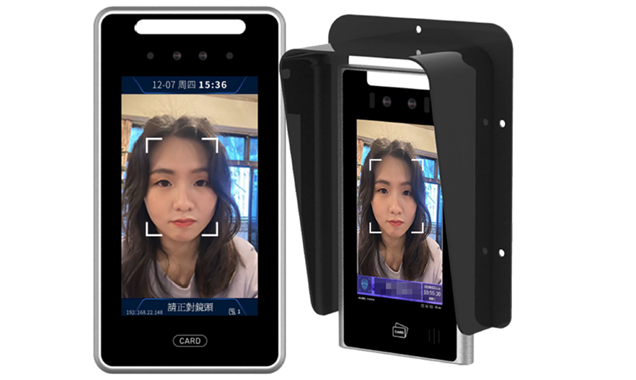
Product Overview
The TR307B is a high-performance embedded dual-lens face recognition access terminal (wall-mount) integrating offline face recognition, liveness detection, blacklist alerts, stranger snapshots and more, with a wide dynamic range HD camera that recognizes reliably in harsh conditions such as backlight and low light. It works with the 4S360 face real-name site management system, attendance management system and visitor management system, and suits construction sites, corporate offices, campuses, communities and other places that need identity recognition.
Key Performance Indicators
TR307B Wall-MountTR307 Series Models
Three options- Wall-mounted installation
- Includes waterproof cover, IP55
- 241×126×21.6mm
- Suited to offices and site gates
- IO input (door contact / fire alarm)
- Mounted on top of the tripod turnstile
- 354.5×126×21.6mm
- Includes metal turnstile bracket
- Suited to personnel control lanes
- Designed for use with tripod turnstiles
- Standalone floor post
- Total height 1542 mm
- Camera 1460 mm above ground
- Suitable for open entrances
- Requires wall-mount bracket B1
Key Functional Features
Dual-lens 2-megapixel camera with a depth lens effectively defends against photo and video attacks, ensuring that only real people can pass.
Supports wide dynamic range, recognizing reliably in harsh conditions such as backlight, low light and strong light, with infrared and white fill lights.
Supports face recognition, IC/ID card, password and other ways to open the door, which can be combined to suit the site, balancing security and convenience.
Immediate alerts on detecting blacklisted persons; strangers (not on the whitelist) entering are automatically photographed and archived, improving site security control.
Supports one-tap switching between attendance mode and access control mode, so one device covers both attendance records and access control.
Supports on-site visitor self-service face capture; the owner or property manager approves online, and once approved the visitor passes by face scan.
Uses an embedded offline recognition architecture, so it keeps working without a network and does not depend on cloud servers, keeping data secure.
Rich, open interfaces with SDK and API documentation, allowing deep integration with the 4S360 platform or existing enterprise systems.
Wall-Mount Installation Guide
Mark the drilling positions on the wall according to the wall bracket hole dimensions (65.6 mm × 64.5 mm × 33.5 mm), hole diameter 4.5 mm, and fix the bracket with expansion screws.
Fix the bracket component in Figure 1 to the wall according to the hole dimensions, then fix the body component in Figure 2 to the bracket and tighten at the bottom with 1 M3 screw.
Connect according to the pigtail labels: power (DC 12V), RJ45 network cable, relay output (NO/COM/NC), IO input (door contact / button / fire alarm), USB.
Mount the lens 140–160 cm above the floor so most people's faces are within the 0.3–4 m recognition distance and face the lens squarely.
Wall-mount external interfaces
Applications
Need advice on choosing a face recognition access terminal?
Based on your site size, installation environment and system integration needs, we recommend the most suitable model and accessories.
Compatible Systems
 4S360 Smart Construction Site Safety Management Platform (Cloud)
4S360 Smart Construction Site Safety Management Platform, cloud edition. No self-hosted server required, includes the 4S360 management app and supports switching between multiple sites. Cloud-exclusive personnel positioning module; the shield tunneling module (PVMS) can be added.
 4S360 Smart Construction Site Safety Management Platform (On-Premises)
4S360 Smart Construction Site Safety Management Platform, on-premises edition. Deployed on the customer's own servers, it integrates face-recognition access control, vehicle management, AI equipment detection, environmental monitoring and LINE push notifications. You keep full control of your data; licensed per site.
 Enterprise Visitor Management System
Visitor Management System 360: integrates parking management and visitor management, with license plate recognition and automatic gate opening, visitor appointment QR codes, security check-in verification and second verification on departure, automatically notifying the host and keeping complete records.